Since when did 'humans' become a frequent word?
Pre-AI, we didn't say "humans" this much, we were just... in it. But once AI entered the room, we started seeing ourselves from the outside.
Designing AI is not always about making the AI smarter—it's always about mapping the UX to the current tech capability. Here are reflections from my work in academia and industry.
Most successful AI products are either easy inferences with great performance, or hard inferences with fair performance.
Designing the relationship
Case study: Elder care Bot

In social science, affiliation means being on someone's side—displaying empathy and matching their preference. It's distinct from alignment, which is just structural cooperation. When designing for trust, affiliation is the emotional bridge.
Instead of AI–individual reaction, this was an HCI research at AI-Caring Institute about AI–group interaction in eldercare and learns to deal with relationships between elder, caregiver, and family.
Designing the feeling
Case study: Human–AI co-writing tool
I worked on a tool to provide real-time support for users writing technical requirements. The AI's job was to reactively correct errors and ensure clarity. This was easy-inference work because the criteria were explicit and quality was measurable.
The goal is not to have users feel the AI. The goal is to have them feel they are supported during writing.
So how do you design a feeling? First, break down what "writing" actually is through task analysis:
Notice step 4: the pause. That's where AI intervention can either help or hurt. The timing of when the AI speaks is the foundation of the feeling.
Three trigger mechanisms
AI judges every keystroke — there's always an eye on you.
The insight: Different triggers create different relationships. Is the AI leading? Waiting? Watching? Interrupting? The trigger mechanism is the most important UX decision you make.
We prototyped each option and tested with users. Writers don't want to think about the AI. They just want to feel supported and write better. The "blur event" trigger won because it respected the human's agency.
Where to NOT use AI
Some people like to analyze it from a business perspective (when the cost of failure is high, when human judgment is irreplaceable, etc) but one day I really feel the AI fatigue and just created this table to summarize feeling from my personal experience and what I've heard from others.
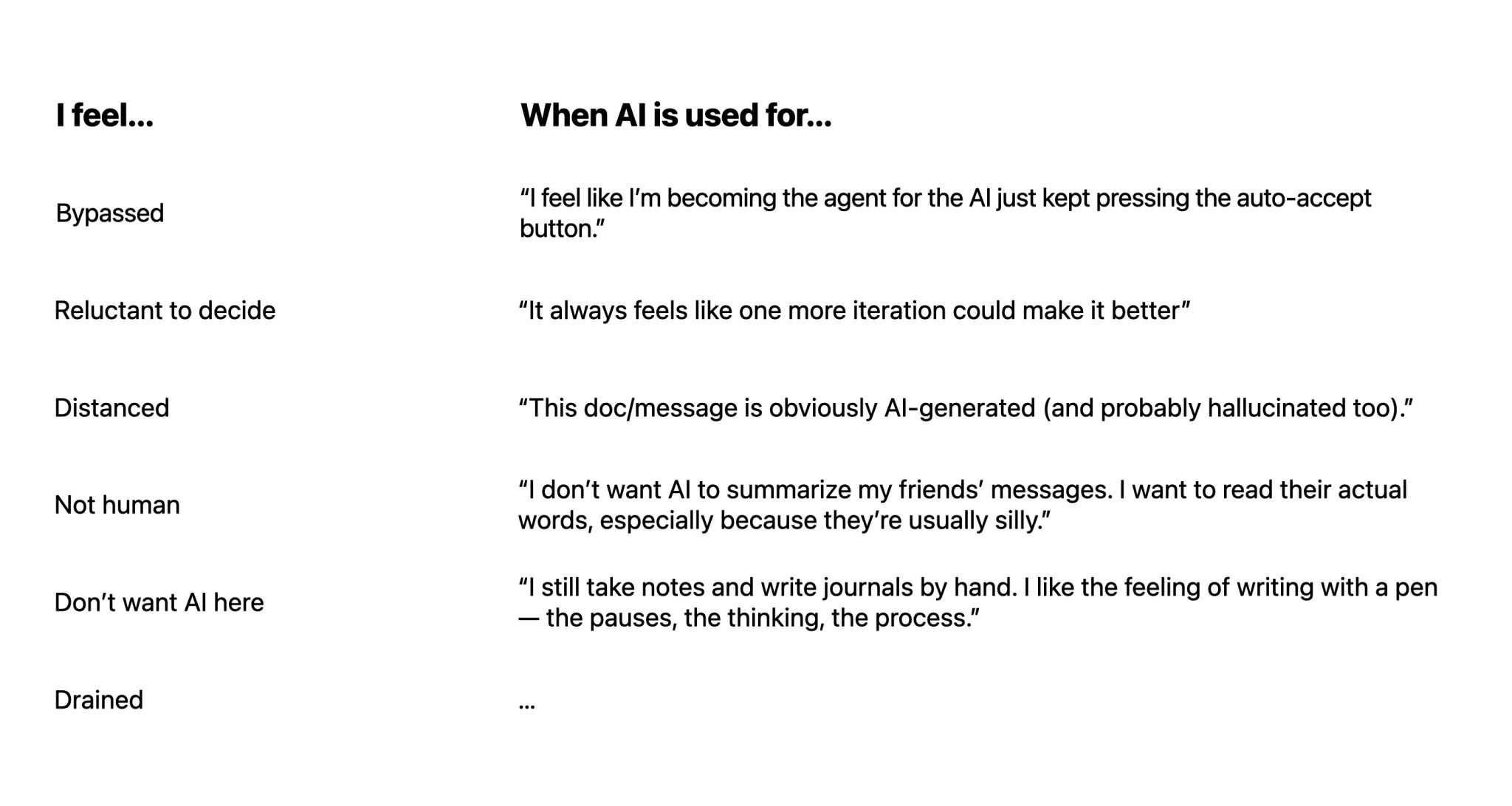
Sometimes, the process itself is the product, and that process generates feelings. When the user feels: Great AI product design knows its boundaries.
I'd want AI that respects human autonomy. What that means in design could be: suggest but not decide, guide but not tell.
Three core lessons
After years of designing AI products across eldercare, co-writing, and enterprise tooling, three things hold true regardless of context:
- The trigger is the relationship. When AI speaks matters more than what it says. The blur event, not the tick, won the writing tool study—because it respected the human's flow.
- Hard inferences require human handoff. The eldercare bot couldn't reason through the "long-term Yes / bad" branch alone. Knowing that limit is a design decision, not a failure.
- Trust is built in small moments. Acknowledge, evaluate, show affiliation, reconfirm. The script looks mechanical written down. Experienced in a product, it feels like being understood.
- Apple — GenAI Prototyper (May 2025 – present)
- The Mentoring Partnership — Conversational AI (Feb 2024 – Aug 2024)
- AI-Caring Research — Conversational AI Researcher (Aug 2023 – Aug 2024)
- Google — UX Designer (Feb 2023 – May 2023)